
Network diagrams that document every port
Click a port, click another: the cable is recorded on both ports. One more click routes every cable cleanly. No separate spreadsheet.
No sign-up · Runs in your browser · Your diagrams stay on your computer
The problem with network documentation
Visio + Excel spreadsheet
DrawNet.ai
Today's workflow
- Draw a logical diagram in Visio or draw.io
- Maintain a separate Excel for port-to-port patching
- Diagram and spreadsheet are never in sync
- New hire? Good luck finding which port goes where
- Hours spent snapping connectors to the right point
With DrawNet.ai
- Switches display every physical port
- Connect port 3 of Switch A to port 12 of Switch B
- Diagram is the patching documentation
- One source of truth — always up to date
- The logical overview is a tab of the same file
One drawing, every view
Draw the network once. The logical overview, the racks and the room plan come from the same devices.
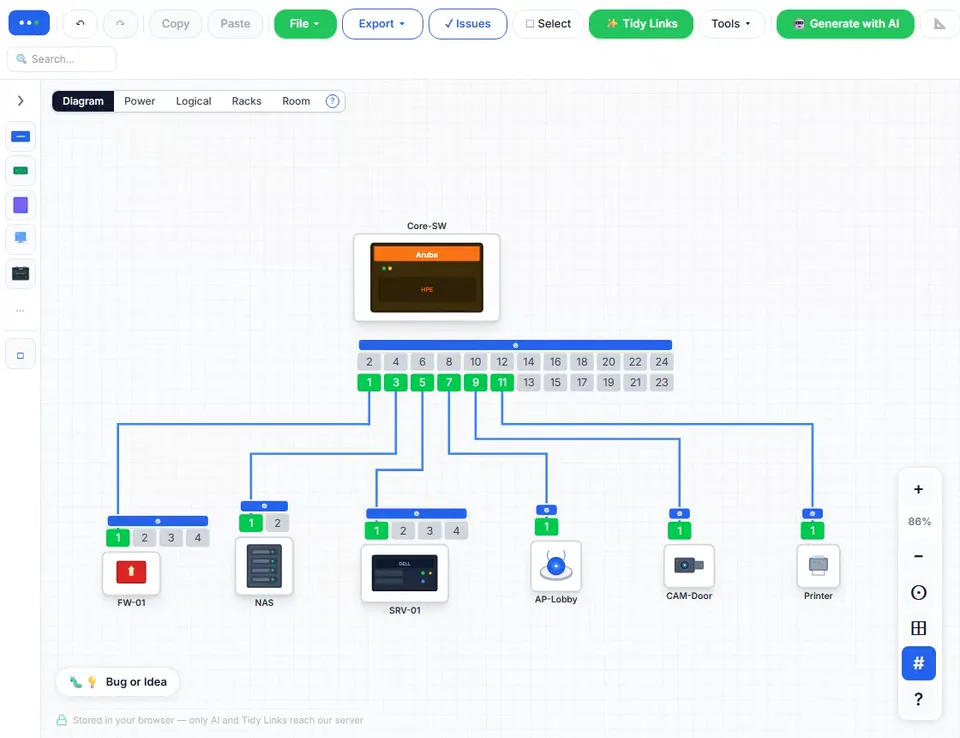
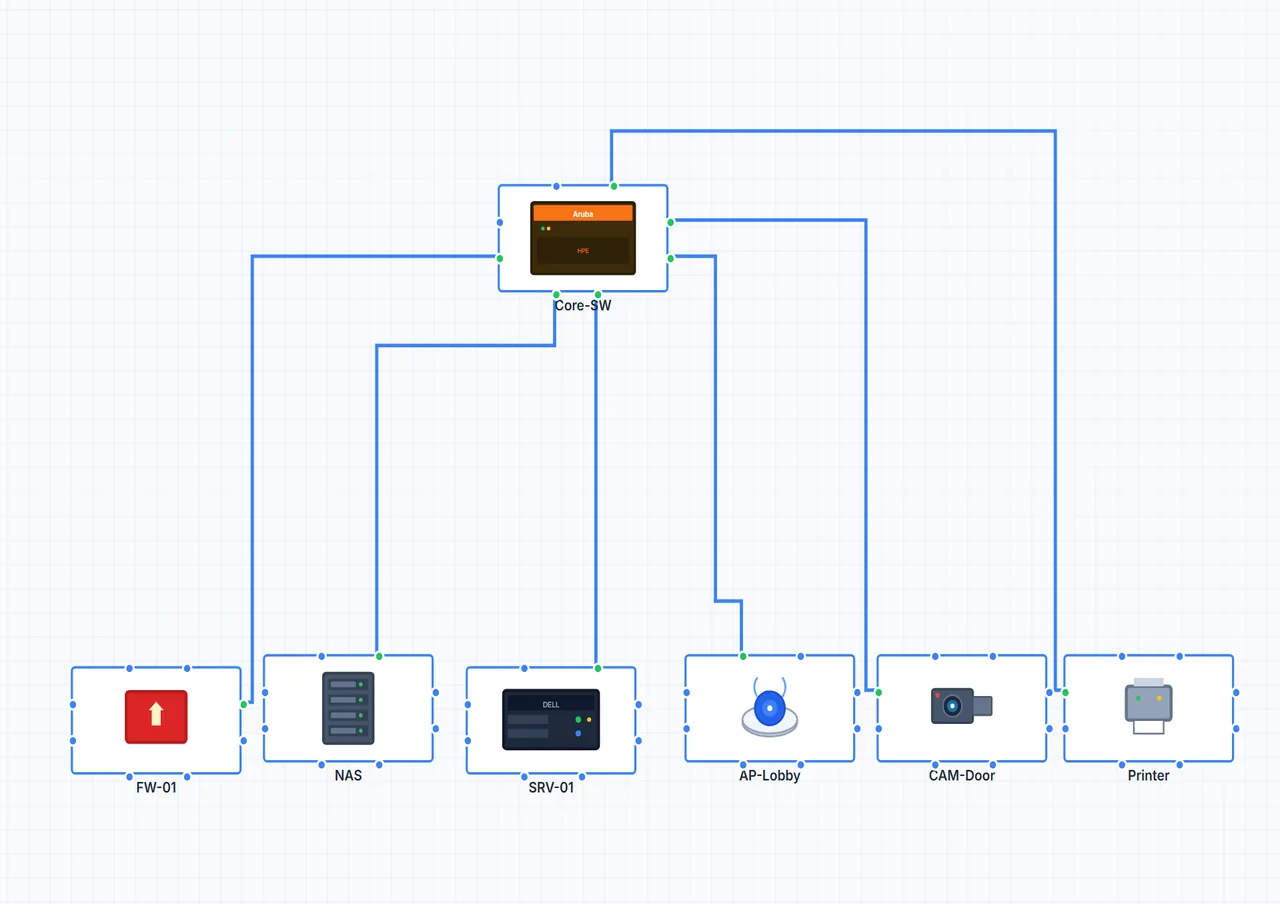
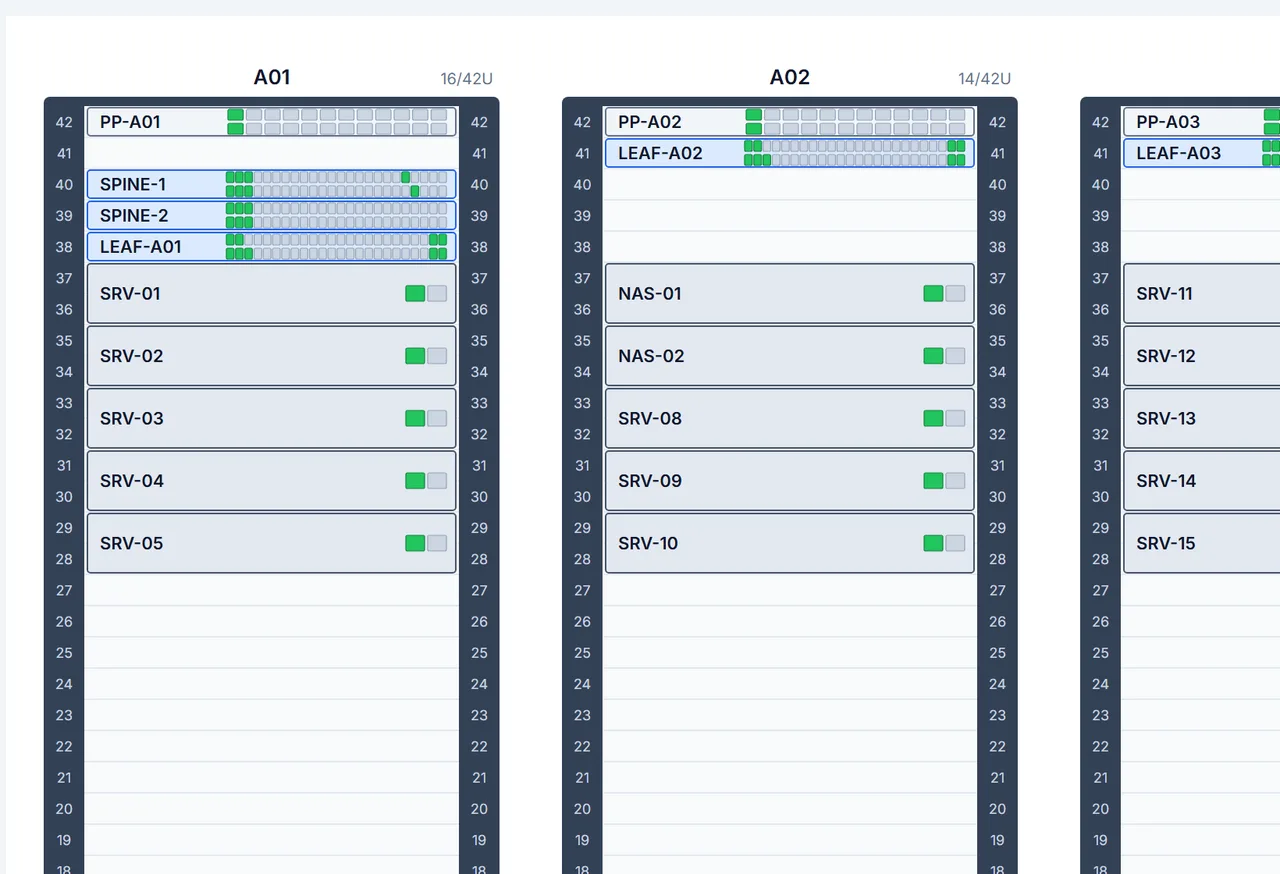
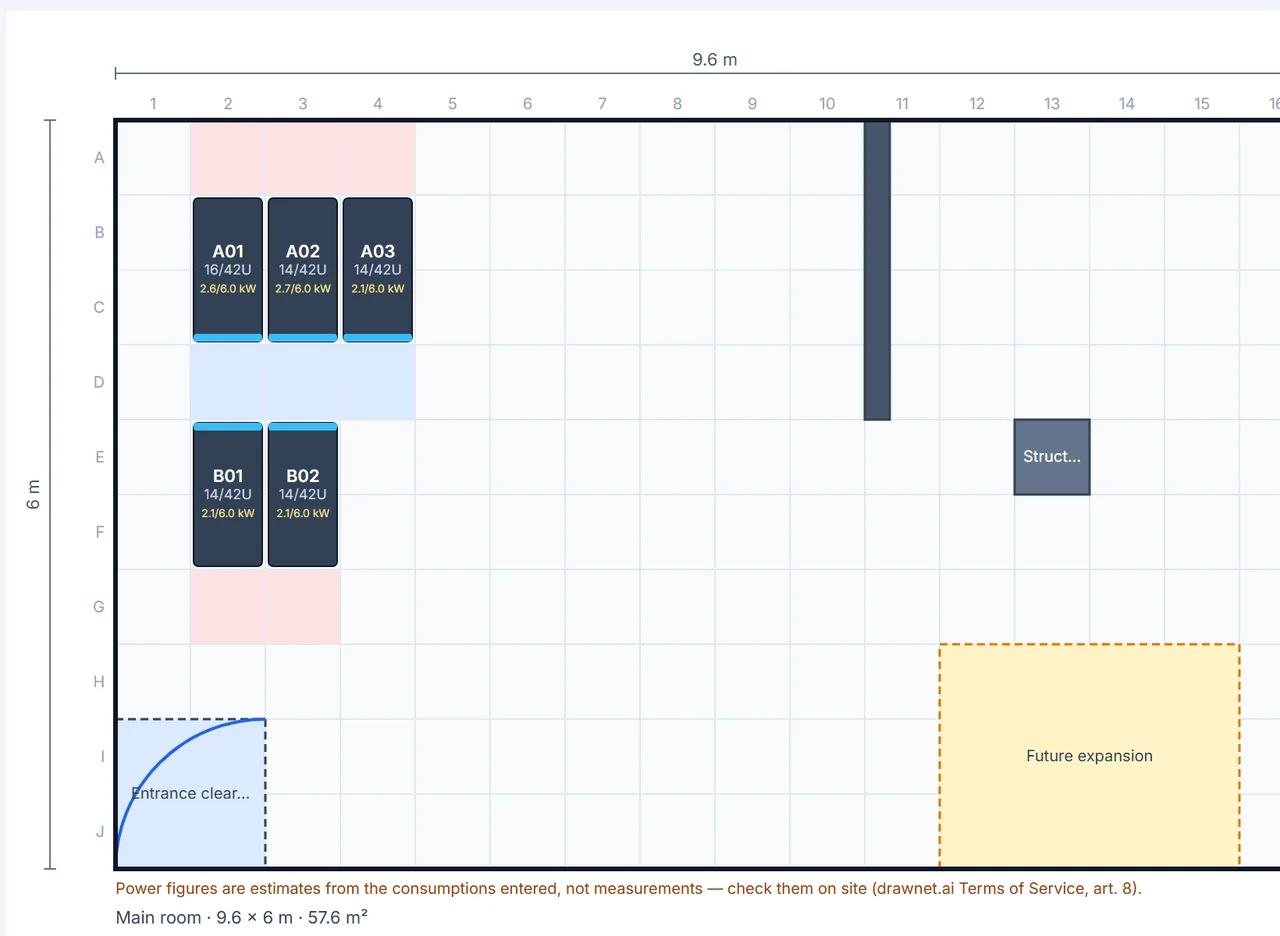
Every port and every cable, routed in one click.
How it works
Four steps. No line to drag, bend or snap.
Drop devices
Switches, routers, servers, firewalls. Each shows its real ports.
Click a port
On the first device. No menu, no dialog.
Click another
On the second device. The cable is created with both port numbers.
Click Tidy Links
Every cable is routed at right angles, without overlaps or crossing a device.
The overview drawing, without the connector fight
Managers and clients want the box-and-line version. In Visio that is a second file and an afternoon of dragging connectors onto the right connection point. Here it comes with the cabling.
Logical sheet, same devices
Click Logical above the canvas: every device is already a box, linked to the ones it is cabled to. Move the boxes; the physical drawing stays as it is.
Lines that straighten themselves
Tidy Links slides each line along the box edges, so facing boxes get a straight line, not two bends.
Visio in, Visio out
Open an existing .vsdx: shapes, pictures and connectors come in. Export back to Visio for colleagues who use it.
Also in the editor
All of it free for personal use, in your browser.
Ports as they are
Any port count, one or two rows, renamed ports (WAN, LAN1…), IP addresses, SFP cages and uplinks.
AI generation
Describe the network in a sentence; the AI draws the devices and cables, and adds to an existing diagram.
Patching table and CSV
Every cable listed port to port. Import a cable list from a spreadsheet by column name.
Racks and room plan
The same devices in rack elevations and on a room plan, with cable lengths and a bill of materials.
Power sheet
230 VAC and 24 VDC wiring on its own tab, over the same devices: feeds, breakers, supplies, terminals.
Exports
PNG, SVG, PDF and Visio, generated in your browser.
Built for small and mid-size networks
Networks of 5 to 50 devices, where you need to know which port connects where.
Maritime & Vessels
Bridge networks, engine room switches and CCTV on ships and yachts, mapped for crew handover.
Learn more →Factories & Industrial
Industrial switches (Moxa, Hirschmann), PLCs, IP cameras and SCADA links, with the 24 VDC wiring.
Learn more →Offices & SMBs
Two switches, a firewall, a NAS, a few printers: a diagram a new hire can follow.
Learn more →Data Centres & Server Rooms
Racks with their real ports, a room plan with hot and cold aisles, power feeds, cable lengths and labels.
Learn more →Hospitals & Clinics
Medical devices, nurse call systems and patient monitors traced to their switch port.
Learn more →Also smart buildings (KNX, PoE cameras, Wi-Fi), homelabs, and CCNA practice with real port numbers — free for learning.
Why a port-level tool for network documentation
Traditional diagram tools like Visio or draw.io treat switches as simple icons — you can't see which physical port connects where. That's why IT teams end up maintaining a separate Excel spreadsheet for port patching, which is never in sync with the diagram.DrawNet.ai solves this by displaying every physical port on each device. When you connect Switch A port 3 to Switch B port 12, that information lives directly on the diagram. One source of truth for your network topology and your patching documentation.
This matters most for small and mid-size networks — offices, factories, ships, clinics, schools — where a technician needs to trace a cable back to the exact switch port without climbing into a rack. Whether you manage an office with 3 switches or a vessel with 20 industrial Moxa switches, DrawNet.ai gives you a single document that replaces both your Visio diagram and your Excel patching sheet. Describe your network in plain English and let AI build the diagram, or drag and drop devices manually. The logical overview for managers and clients is a tab of the same diagram, straightened in one click, and an existing Visio drawing can be opened rather than redrawn. Export to PNG, SVG, PDF, or Visio — free for personal use, no account needed.
How does DrawNet compare?
What each tool does for network documentation.
| Feature | DrawNet.ai | Visio | draw.io |
|---|---|---|---|
| Physical port display | ✓ | — | — |
| Port-to-port connections | ✓ | — | — |
| Built-in patching table | ✓ | — | — |
| AI diagram generation | ✓ | — | — |
| Auto-routing straight links | ✓ | — | ✓ |
| Works offline (PWA) | ✓ | ✓ | — |
| Export PNG / SVG / PDF | ✓ | ✓ | ✓ |
| Visio format export | ✓ | ✓ | ✓ |
| Visio file import | ✓ | ✓ | ✓ |
| Logical view from the same devices | ✓ | — | — |
| Cable path tracing | ✓ | — | — |
| No account required | ✓ | — | ✓ |
| Free for personal use | ✓ | — | ✓ |
| Runs in browser | ✓ | — | ✓ |
| General-purpose diagrams | — | ✓ | ✓ |
Visio requires a Microsoft 365 subscription ($13+/mo) and its connector snapping system can be frustrating when trying to keep links straight and anchored to the right point. draw.io is free and excellent for general-purpose diagrams but has no network-specific features. DrawNet is purpose-built for network documentation with port-level precision and automatic link routing. One caveat on the offline row: drawing, editing, saving and exporting all work without a connection, but Tidy Links runs on our server and needs one.
Your Data Stays With You
100% client-side — no account, no cloud, no tracking of your diagrams
Browser-only storage
Diagrams are saved in your browser’s local storage. We never see them.
Local file exports
PNG, PDF, SVG, and Visio files are generated entirely in your browser.
No account required
Start drawing straight away. No sign-up, no email address.
AI is optional
Nothing is sent unless you ask the AI: then your request goes, and, to add to a diagram, the names, ports and cables it builds on.
Yours for good
Diagrams save to a JSON file on your own disk and export to formats other tools already read. No account to be locked out of, nothing stranded on our servers.
Why is DrawNet free?
"If it's free, you're the product" — not here.
You are not the product. Your diagrams stay in your browser, and nothing about you is sold. DrawNet is free for personal use, learning and nonprofits — the whole tool, forever. Companies that use it for paid work buy a licence, on the honour system: no account, nothing locked or held back. The editor mentions it once, on a diagram that has outgrown personal use, and never again.
We're a company based in Paris, France — CYZEA SAS, registered since March 2021 and trading ever since. We originally built DrawNet for our own network documentation needs. It solved our problem so well that we decided to share it with the community.
Hosted in France, under EU data protection law (GDPR). What we build next comes from real-world feedback, and every message sent from the editor is read.
The licence keeps the free version whole: no cut-down tier, nothing behind a paywall. If DrawNet earns its place in your company's toolbox, that is how it gets paid for.